Talk: The curious player of Benjamin Button: reverse video on the web
At Demuxed 2023, I came back with a sequel: I took baby’s first HTML5 <video> element and taught it to play video (and audio) backwards, frame by frame.
Watch the talk below, or read on to find out how it works.
Watch the talk
Transcript
Tskumied, eyb doog! (reversed: “Good bye, Demuxed!“) Wait, um, sorry — that’s my outro slide, I think I’m still in reverse. Anyway, there we go.
Hello, Demuxed! Thanks for having me back, and look, I even brought some professionally looking slides this time. So, I’m Mattias, and I’m once again going to talk about making a video player on the web. But this time, I’m making the player go backwards.
Now, why would we need this? Like, video should just go forward, why do we need it to go backwards? Well, for video editing it’d be helpful: if you want to find the exact frame where something happens, to mark the start of a clip, it helps to go backwards and forwards for a bit instead of repeatedly seeking all over the place. Or, if you’re a video-assisted referee, you may want to find the exact frame when an attacker kicks the ball, and then draw an imaginary line across the field or something like that — I don’t know how the offside rule works. Or, thirdly, you may want to make funny GIFs, which are funnier in reverse — like, they have a green tongue, and that’s the reason why the internet exists after all.
So, isn’t this already possible? Well, if you ask MDN, it says that if
the playbackRate is negative, the media is played backwards. Problem
solved! Well, yes, but actually no. If you scroll down that page, you get
to the browser compatibility table, and for Chrome it says: setting the playbackRate to a negative value will throw an error. So, well, that’s
just Chrome — maybe we’ll have better luck in another browser. Okay,
let’s hope for Safari — that says full support, so maybe Safari works.
So here’s Safari: this is a video playing directly in Safari, this is
just playing forwards. I’m now using the console to put it backwards,
with a playbackRate of minus one, and… okay, this is more of a
slideshow, this is not really playing backwards, I’d say. So, valiant
effort, but no, this doesn’t count.
So, now what? None of the major browsers support reverse playback, so
are we out of options? Well, if we can’t use the browser’s video element,
then maybe — just maybe — we can make our own video element, right? Yes!
I am bringing back baby video element for a second iteration this year.
Love it. If you missed my talk last year, or you’ve erased that from
your long-term memory, here’s a quick recap: baby video element is an
HTML custom element which implements part of the video element API — play(), pause(), currentTime, events, that sort of stuff — along
with the Media Source Extensions API, so you can do things like MediaSource, SourceBuffer, appendBuffer(). It’ll parse your fMP4
into individual video frames, it’ll then decode those frames using the
WebCodecs API, and it’ll render those video frames to a <canvas> for
display.
Now we are going to make that player go backwards. We need to do three things for that: we need to buffer in reverse, we need to decode in reverse, and we need to render in reverse.
So, step one: buffering. In a normal player, this is what your buffering loop looks like, somewhat: if you have enough buffer after your current time, you’re good, just wait a bit, don’t need to do anything just yet. If you don’t, you find the next segment that goes after your end of buffer, you download and append that, and if it’s the last segment then you’re done buffering, otherwise just repeat, go back to the top. We want to do this in reverse, so we just find-and-replace a couple of things: we need to check for enough buffer before current time, we need to find the previous segment, and we’re only done when we reach the first segment. This way, we’ll buffer from the back of the video all the way to the front.
Great, so we’ve got that, we have appended our fMP4 segments, we’ve
parsed them into individual frames. Now we just need to decode them in
reverse: start with frame six, run that through the VideoDecoder from
WebCodecs, store the resulting decoded frame, then we just do frame
five, frame four, frame three, and so on, right? Should work. Ah, wait,
that’s weird, I didn’t put this slide here — I guess I should warn you
that there’s going to be flashing images on the next slide. That doesn’t
really bode well for my video decoder though, so here it goes: we’ll put
the player in reverse mode and then play, and… oh god, yeah, no,
that’s not how I remember it. As video engineers, we’ve all seen those
green frames before, and they haunt our nightmares. So let’s get rid of
that.
So, what went wrong? Well, the video consists mostly of P-frames and B-frames, and we cannot decode those independently. There’s this thing called inter-frame prediction, which uses motion vectors, and we can’t just reverse that to get reverse decoding to work. So, within a group of pictures — a GOP — we actually have to send the frames in their original order. We can still change the order of the GOPs, though, so that would look something like this: our frame six is actually in GOP two, so to decode this we need to first decode our key frame, frame four, and then decode the others in their original order, and then we’ll get on with GOP one, and keep those in our decoded frame buffer.
Now the only thing that’s left is rendering: so, on every animation frame, we decrease the current time by the elapsed wall-clock time, we find the frame at that current time, and we draw that to the canvas. Now, the decoded frames are in a slightly different order, so we have to look a bit further in our list, but that’s all doable. So then that looks something like this — and that is a reverse-playing Big Buck Bunny. The butterfly is going backwards, Big Buck Bunny has never seen this before, he smells some flowers in reverse. Great, that works!
So, we got this thing working, but we’ve encountered some challenges along the way, and that impacts some of the performance of this thing. For example, we need to keep the entire group of pictures in memory, because the first frame that we decode is actually the last frame that we want to render out of that GOP, and the GPU can only hold so many fully decoded video frames in its video memory. So we actually have to copy those frames out of video memory and back into it when we need them, which is slightly less efficient, but hey, at least it works — we got it working, which is the main point we’re trying to make. When we finally render that first video frame, we should also have that next frame ready, which is actually the last frame of the previous GOP — if you’re still following along — so we need to make sure that we have at least two GOPs fully decoded by then. So, that again puts some pressure on the memory. This is usually not a problem if you have a desktop device with plenty of RAM, but it might not play as smoothly on low-end smartphones. You can try downloading more RAM or something, I guess, that’s what you’re supposed to do then.
As a bonus, I’ve also made this thing play audio. I don’t really have a
use case for this, it’s just for fun, but it’s much simpler than video:
audio frames, you can decode those fully independently. And then we also
need to make sure that — since each frame actually contains multiple
samples — we reverse those as well, if you want it fully reversed. We
use Web Audio to render these: there’s the AudioBufferSourceNode,
which you can give an audio buffer and it’ll play it for you at a set
time, so we can schedule things slightly in advance to avoid leaving
gaps, and we can concatenate multiple audio frames to reduce the number
of nodes that we use. Ideally you’d use AudioWorklet for this, I
didn’t get that to work yet, but maybe future work. This is what that
looks and sounds like — there’s a bit of a crackle, if you’re listening
to this on the livestream, so maybe I should really give AudioWorklet a try. But at least we get the good ending of Big Buck Bunny, because
the butterfly lives again. Glorious.
So there you have it. If you want to toy around with this, you can scan the QR code, or go to my GitHub profile, it’s all there. Thanks for listening! Oh, and if you’re still watching this talk in reverse for some reason… Tskumied ooleh! (reversed: “Hello, Demuxed!“)
Motivation
Video on the web only goes one way: forward. Press play, and time marches on. Why would you ever want it to go the other way?
There are a few good reasons:
- Video editing. Finding the exact frame where a cut or a transition happens is a lot easier if you can step backwards and forwards around it, instead of seeking over and over and guessing where you landed.
- Video-assisted refereeing. Scrub through a replay to find the exact frame where an attacker’s boot touches the ball, then freeze it and draw an imaginary line across the pitch. (Or something like that. I don’t really know how the offside rule works.)
- Funny GIFs. The reason the internet exists.

Peak internet content, now available in reverse.
Isn’t this already possible?
Surely someone has thought of this already? Indeed, MDN’s docs on playbackRate say exactly what we want to hear:
A negative
playbackRatevalue indicates that the media should be played backwards, but support for this is not yet widespread.
“Not yet widespread”, you say? Let’s see if we can get more details from the browser compatibility table.
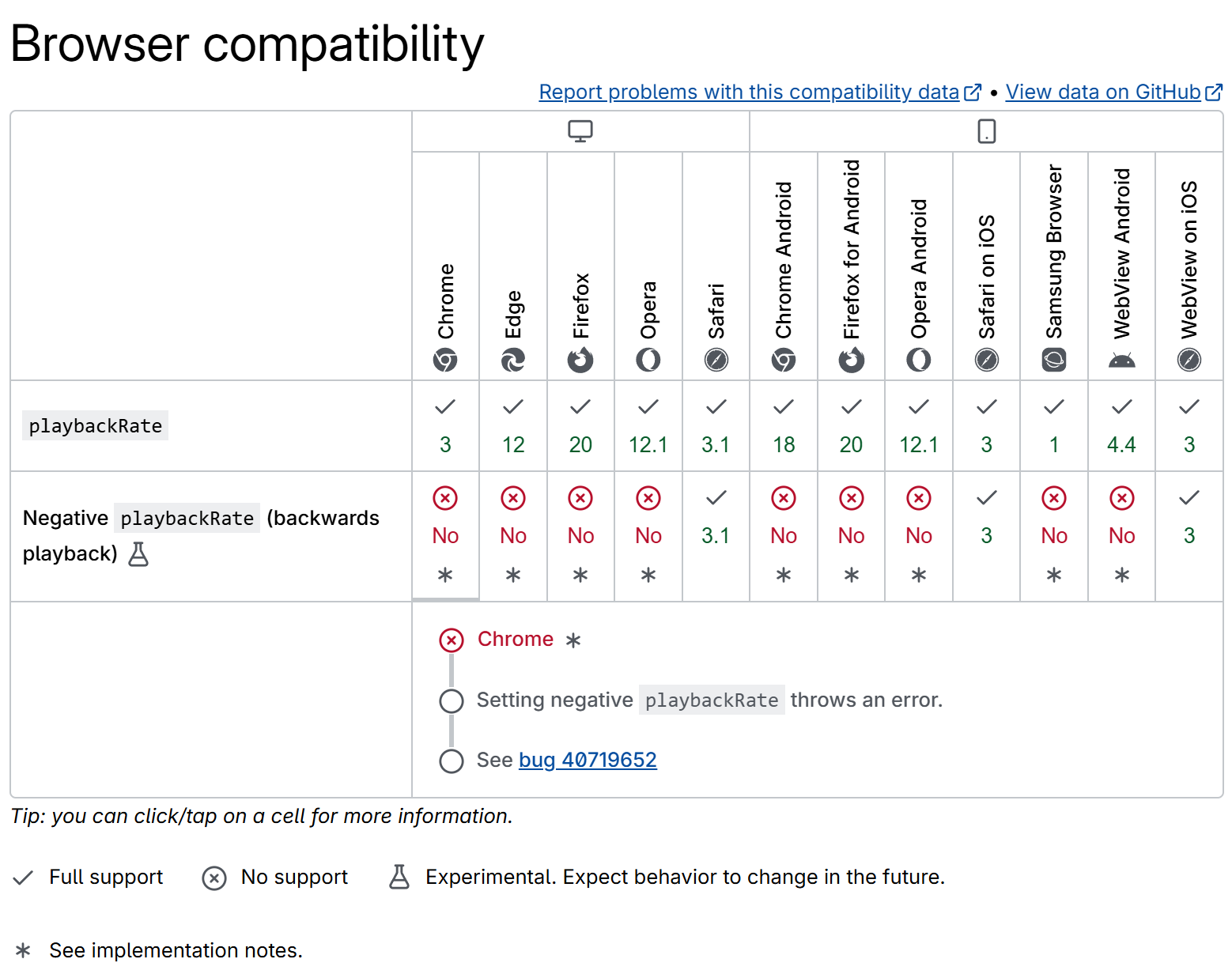
That’s a “no” across the board, except for Safari. So does that one work?
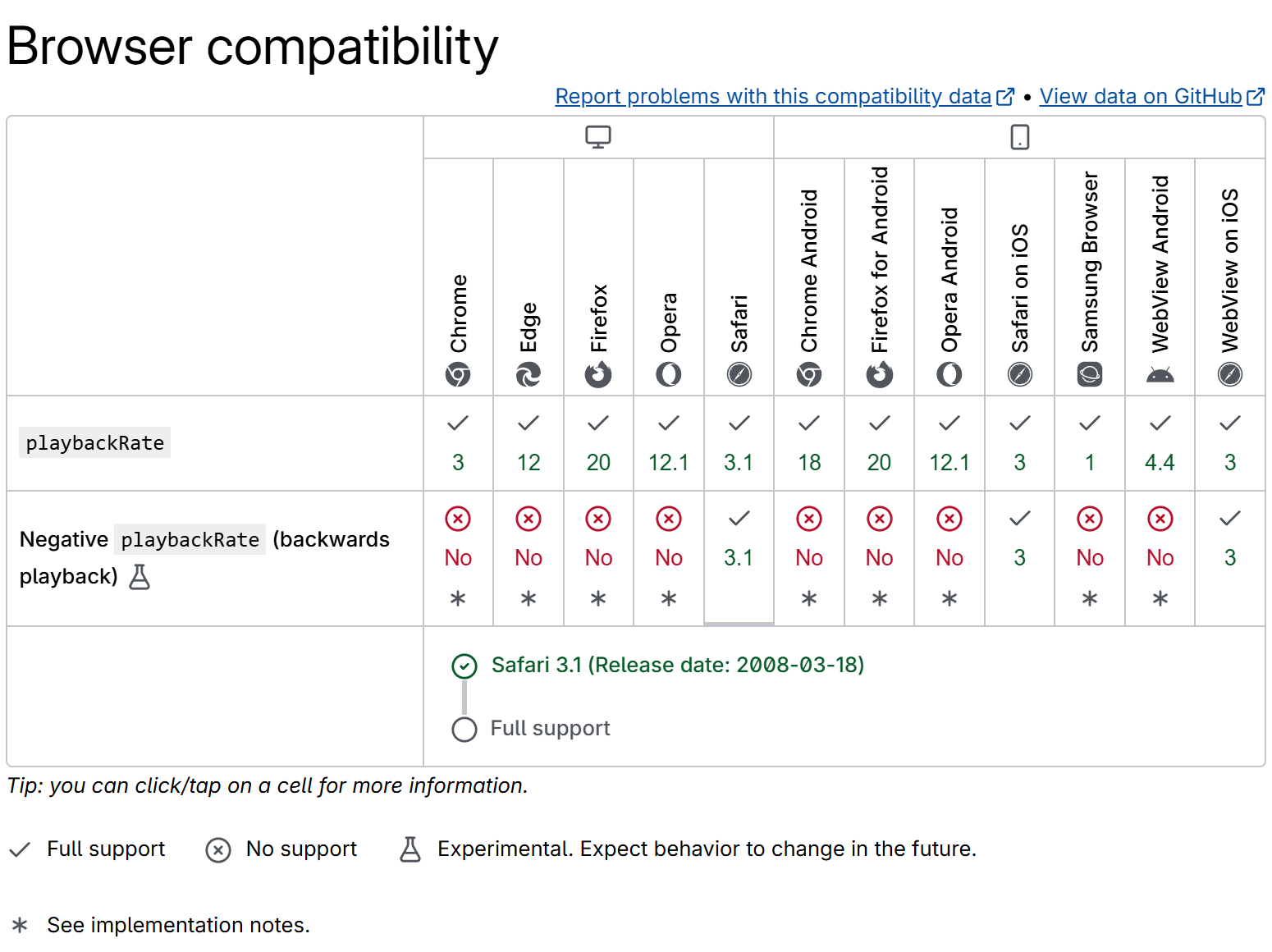
Supposedly, Safari has supported negative playbackRate since version 3.1, released all the way back in 2008.
Let’s find out. Open a video in Safari, open the console, and set playbackRate to -1.
It’s technically moving backwards, but at maybe one or two frames per second. That’s less “reverse playback” and more “a slideshow in the wrong order”. A valiant effort, but it doesn’t count.
So in practice, none of the major browsers support reverse playback, whatever the spec and the compatibility tables promise. Are we out of options?
Recap: baby’s first video element
If the browser’s <video> element won’t play in reverse, why not build one that will? I already did most of the work for last year’s talk: <baby-video>, a custom element that reimplements a large part of the <video> element from scratch.

Yes, we’re back. No, my slide design still hasn’t improved.
Quick recap:
- It implements part of the
<video>element’s API:play(),pause(),currentTime, events, and so on. - It also implements the Media Source Extensions API:
MediaSource,SourceBuffer,appendBuffer(). - It parses incoming fragmented MP4 into individual encoded video frames.
- It decodes those frames with the WebCodecs API.
- It renders the decoded frames onto a
<canvas>.
Since we already handle buffering, decoding and rendering ourselves, we can make each of those three steps run backwards.
Step 1: buffering in reverse
Every streaming player has a buffering loop that looks more or less like this:
- If there’s enough buffer after current time, wait.
- Find the next segment after the end of the buffer.
- Download and append that segment.
- If it was the last segment, we’re done buffering.
- Otherwise, repeat.
To buffer in reverse, we flip the direction of each step:
- If there’s enough buffer before current time, wait.
- Find the previous segment before the start of the buffer.
- Download and append that segment.
- If it was the first segment, we’re done buffering.
- Otherwise, repeat.
We can implement both as a single loop, with a forward flag that decides the direction of each step. Here’s a trimmed-down version of the real loop, which also handles evicting old data from the buffer and aborting on a seek:
async function fillBuffer(sourceBuffer) {
  while (true) {
    const forward = video.playbackRate >= 0

    // Wait until we're running low on buffer in our playback direction.
    while (true) {
      const range = sourceBuffer.buffered.find(video.currentTime)
      if (!range) break // no buffer at all, fetch immediately
      const bufferedAmount = forward
        ? range.end - video.currentTime
        : video.currentTime - range.start
      if (bufferedAmount <= bufferGoal) break
      await waitForEvent(video, ['timeupdate', 'ratechange'])
    }

    // Find, download and append the next segment in that direction.
    const range = sourceBuffer.buffered.find(video.currentTime)
    const nextTime = range ? (forward ? range.end : range.start - 0.001) : video.currentTime
    const nextSegment = getSegmentForTime(nextTime)
    const segmentData = await (await fetch(nextSegment.url)).arrayBuffer()
    sourceBuffer.appendBuffer(segmentData)
    await waitForEvent(sourceBuffer, 'updateend')

    // Stop once we've reached the front of the video (in reverse) or the end (forward).
    if (forward ? nextSegment.isLast : nextSegment.isFirst) {
      return
    }
  }
}
The segments themselves don’t change. When playbackRate goes negative, we simply walk through the list of segments back to front instead of front to back.
Next up: making the decoder work in reverse.
Step 2: decoding in reverse
We’ve appended our fMP4 segments and parsed them into individual encoded frames. Decoding them in reverse sounds just as simple as buffering in reverse: take the last frame, run it through WebCodecs’ VideoDecoder, store the decoded frame, and work backwards from there.

Feed the encoded frames to the decoder back to front, and get decoded frames back in the same order. Should work, right?
Let’s try it on Big Buck Bunny:
⚠️ Content warning: the clip below contains flashing images.
That is not how Big Buck Bunny is supposed to look. As video engineers, we’ve all seen those green frames before, and they haunt our nightmares.
The problem is that most frames in a video are P‑frames and B‑frames, not full images. They only encode the difference (motion and error) relative to other nearby frames, so they can’t be decoded on their own. Feed them to the decoder in the wrong order, and there’s no reference frame left for them to be a difference from. Hence the green mess.
Inter-frame prediction in action. The arrows show where each macroblock moved from in the previous frame. A small residual then corrects whatever the motion alone didn’t capture.
So we can’t simply feed frames to the decoder in reverse. But we don’t have to give up on reordering entirely:
- Frames within one group of pictures (“GOP”) must still go to the decoder in their original order, since they depend on each other.
- We can change the order in which we send entire GOPs, since those are independent of one another.

To decode frame 6, we still need to decode frames 4 and 5 first. So we send GOP 2 to the decoder before GOP 1, but keep the frame order within each GOP intact.
Step 3: rendering in reverse
The decoder now works, but its output isn’t in the right order yet. Frames come out grouped by GOP: 4, 5, 6, 1, 2, 3 instead of the 6, 5, 4, 3, 2, 1 we want to show. Untangling that is the renderer’s job.
On every requestAnimationFrame():
- Decrease
currentTimeby the elapsed wall-clock time. - Find the decoded frame at
currentTime. - Draw that frame to the
<canvas>.
The first step needs no changes: currentTime already advances by playbackRate * elapsedTime on every frame, so with a negative playbackRate it counts down on its own. The second step is where we undo the reordering from step 2, in #renderVideoFrame():
#renderVideoFrame() {
  const currentTimeInMicros = Math.floor(1e6 * this.#currentTime)

  // Find the frame whose timestamp range contains currentTime.
  const currentFrameIndex = this.#decodedVideoFrames.findIndex(
    (frame) =>
      frame.timestamp <= currentTimeInMicros &&
      currentTimeInMicros < frame.timestamp + frame.duration
  )
  if (currentFrameIndex < 0) {
    return // still decoding, nothing to render yet
  }

  const frame = this.#decodedVideoFrames[currentFrameIndex]
  this.#canvasContext.drawImage(frame, 0, 0, frame.displayWidth, frame.displayHeight)
}
findIndex() doesn’t care where a frame sits in the array. It looks for the frame whose timestamp covers currentTime, wherever it is. So it doesn’t matter that our decoded frames are stored as 4, 5, 6, 1, 2, 3 instead of 6, 5, 4, 3, 2, 1. The renderer sometimes has to look a bit further down the list, that’s all.
And there it is: Big Buck Bunny, playing in reverse, butterfly and all.
Challenges
Getting this to work exposed two memory problems that forward playback never has to deal with.
The first one follows directly from step 2. To decode frame 6, we first had to decode frames 4 and 5. The first frame we decode from a GOP is the last one we render, so the whole GOP has to be kept around in decoded form. That’s a problem, because the GPU can only hold on to a handful of decoded frames at once. The workaround is to copy each frame out of GPU memory with createImageBitmap(), and copy it back in when we need to render it. That’s less efficient than leaving frames where they are, but it works well enough.
The second one is about staying ahead. By the time we render the first frame of a GOP, the next frame had better be ready. That’s the last frame of the previous GOP, so that GOP must also be decoded well in advance. <baby-video> doesn’t handle this as a special case. It always tries to keep a healthy buffer of decoded frames ahead of the current position, which covers this case too, at the cost of using even more memory.
None of this is a problem on a desktop with plenty of RAM and a fast GPU, but it might not play as smoothly on a low-end smartphone. Sorry. You can try downloading more RAM.
Bonus: reverse audio
There’s no real use case for this, but since I’d already come this far, <baby-video> plays audio in reverse too.
Audio is a lot simpler than video:
- Audio frames are encoded independently, so they can be decoded in any order. No GOPs, no dependency chains, none of the headaches from step 2.
- Each audio frame contains many samples, though, so putting the frames in the right order isn’t enough. The samples within each frame need to be reversed as well.
For rendering, we use Web Audio’s AudioBufferSourceNode. <baby-video> concatenates several decoded audio frames into a single AudioBuffer (so there are fewer nodes to manage). For reverse playback, it reverses both the order of the frames and the samples within them, in #renderAudioFrame():
#renderAudioFrame(frames, direction) {
  // When playing backwards, frames arrive in reverse order,
  // so put them back in chronological order first.
  if (direction === Direction.BACKWARD) {
    frames.reverse()
  }

  // Concatenate all frames into a single AudioBuffer.
  const audioBuffer = new AudioBuffer({
    numberOfChannels: frames[0].numberOfChannels,
    length: sumWith(frames, (frame) => frame.numberOfFrames),
    sampleRate: frames[0].sampleRate
  })
  for (let channel = 0; channel < audioBuffer.numberOfChannels; channel++) {
    const options = { format: 'f32-planar', planeIndex: channel }
    const destination = audioBuffer.getChannelData(channel)
    let offset = 0
    for (const frame of frames) {
      const size = frame.allocationSize(options) / Float32Array.BYTES_PER_ELEMENT
      frame.copyTo(destination.subarray(offset, offset + size), options)
      offset += size
    }
    // Now reverse the actual samples too.
    if (direction === Direction.BACKWARD) {
      destination.reverse()
    }
  }

  this.#scheduleAudioBuffer(audioBuffer)
}
The buffer then goes to an AudioBufferSourceNode, which is scheduled slightly ahead of time with node.start(when), so a late call doesn’t leave an audible gap. An AudioWorklet would probably do an even better job, but I never got around to trying that.
There’s still a bit of crackling, so AudioWorklet might be worth revisiting someday. But it’s good enough to enjoy the ending the way it was meant to be: the butterfly comes back to life.
Conclusion
Reverse playback didn’t need a separate design. Buffering needed a forward flag in the loop it already had. Decoding needed to send the same GOPs to the same VideoDecoder, just in a different order. Rendering barely changed at all. The real cost is memory: reverse playback has to keep an entire GOP in decoded form, since the first frame it decodes is the last one it shows. And audio, with no inter-frame prediction to worry about, was about as simple as it sounds.
You can try <baby-video> yourself in a browser that supports WebCodecs. Click the “1x” playback rate button in the controls to switch it to “-1x”, and watch it play backwards. The full source code is on GitHub if you want to poke around.
